2-Architecture, Prerequisites, and Connectivity
Context and objective
This chapter deals with the topics of Architecture, of Prerequisites, of Perimeter, of Outside the Perimeters, the Opening network flows and the Connectivity settings.
It is essential to share the network flow opening information with the person or team who will be in charge; this is crucial to ensuring the connector functions correctly. Refer to the section opening network flows.
Regarding connectivity settings, upon receiving the Yooz instance, you can check if you have the rights to generate the API token codes (client id and client secret), or if you need to contact your Yooz representative.
Setting up the prerequisites involves several points that are the responsibility of the client or their integrator.
Here is an example of a shared deliverable that allows progress to be tracked during implementation.
Link to the prerequisites tracking sheetYoozConnectorX3-Prerequisites
This chapter addresses these phases of implementation:
| ▼ | ▼ | |||||
|---|---|---|---|---|---|---|
| Pre-sales | Initialization | Framing | Installation | Setting | Recipe | Production launch |
1. Architecture
This is an add-on module for Sage X3, installed as Sage X3 patches and fully compatible with native 4GL. Specific developments are implemented in the 4GL vertical layer. Therefore, no additional technical infrastructure is required; the module is 100% integrated into the existing Sage X3 solution. All objects are protected by an 'XRJ31' activity code.
For data flows from X3 to Yooz, Sage X3 uses Yooz's REST web services. Conversely, Yooz calls Sage X3's SOAP web services. Both flows are available as standard in Sage X3. The only deviation from the X3 standard is the addition of a CURL binary and library to handle a specific aspect of the Yooz API for exporting purchase orders (encapsulating a JSON file within the REST request is required).
No middleware is needed. The connector does not allow communication via files, nor via FTP or SFTP servers.
2. Prerequisites
Version Sage X3
The connector is available for all versions of Sage X3 12, starting with patch 21 (2020 R1). Previous versions are not supported due to changes in compiled processing (ADX).
Network connectivity
Bidirectional access is required between Sage X3 and the Yooz platform. Specifically, the Yooz application must be able to reach the Sage X3 web service endpoint, which requires opening an inbound communication channel from the internet. Detailed information is available in the Connection paragraph.
Licence (badge) Sage X3
An ERPFULL badge must be available to be allocated to a new user account dedicated to Yooz web services.
3. Perimeter
The Yooz X3 connector covers the X3 Purchasing, Finance and Sales scopes, in connection with Yooz functionalities.
Table of features
| Typology | Functionality | Sage X3 Function |
|---|---|---|
| Connector settings | Parameter values | ADPVAL |
| Data restrictions | At the level of each function | |
| Sending via API to Yooz | X3 Users | GESAUS |
| Articles | GESITM | |
| Analytical axes | GESCCE | |
| Accounting records | GESGAC | |
| Tax rates | GESTVT | |
| Payment terms | GESTPT | |
| Suppliers | GESBPS | |
| Payment confirmation | ||
| Purchase order | GESPOH | |
| Reception | GESPTH | |
| Returns | GESPNH | |
| Purchase invoice validation | FUNPIH | |
| Validation of third-party supplier invoices | ||
| Clients | GESBPC | |
| Sales invoices and credit notes | GESSIH | |
| Third-party customer invoices | GESBIC | |
| Received via Yooz API | Purchase invoice on order | including line management, order and receipt matching, and billing elements |
| Third-party supplier invoices | ||
| Good to pay | ||
| Utilities | Force timestamp on Yooz interfaces | XRJ31YOOZFLG |
| Yooz reference data retrieval | XRJ31YOOZREP | |
| Yooz Connector Update | XRJ31UPD | |
| Custom fields (10 max) | X3 Users | |
| Site X3 | ||
| Analytical axes | ||
| Accounting records | ||
| Tax rates | ||
| Payment terms | ||
| Suppliers | ||
| Purchase order | ||
| Reception | ||
| Purchase invoice | ||
| Third-party supplier invoice | ||
| Clients | ||
| Sales invoices and credit notes | ||
| Third-party customer invoices |
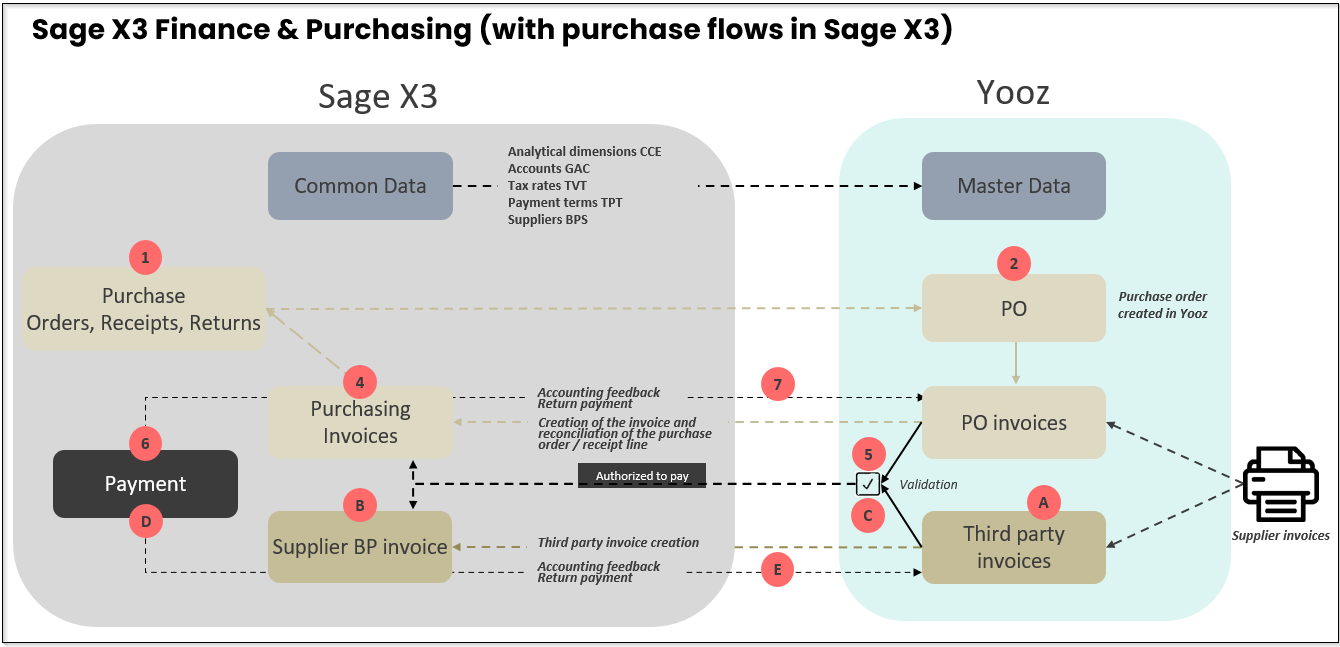
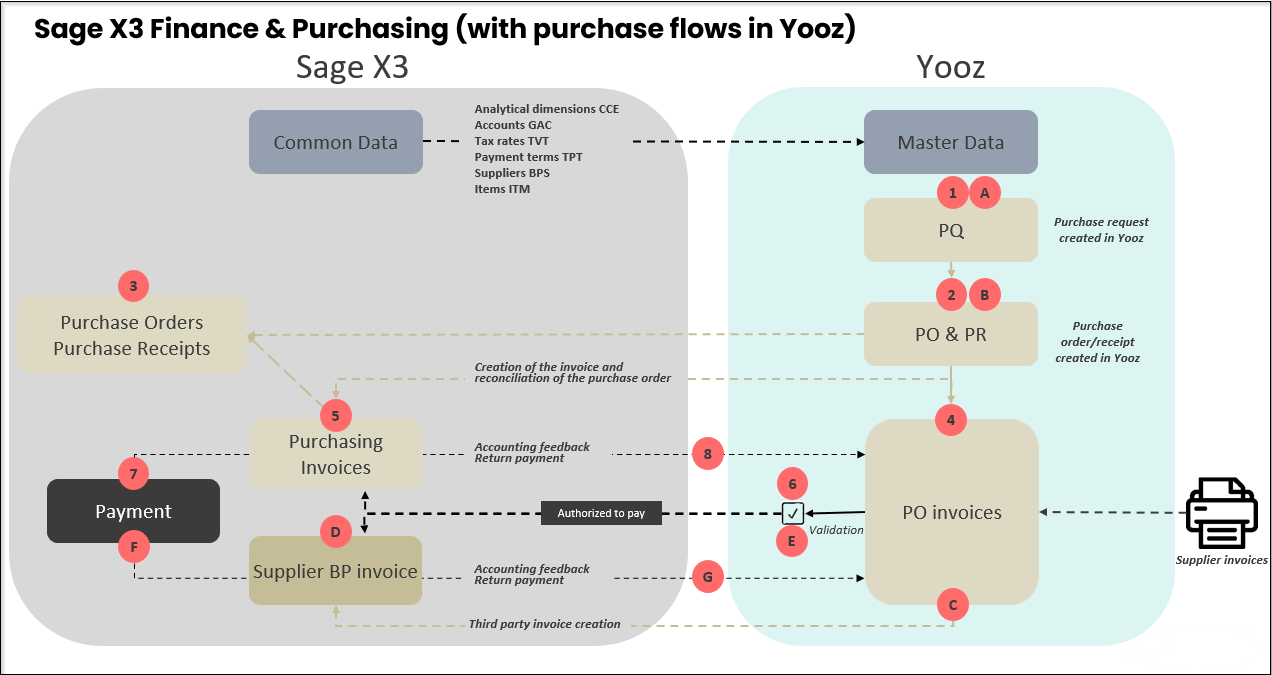
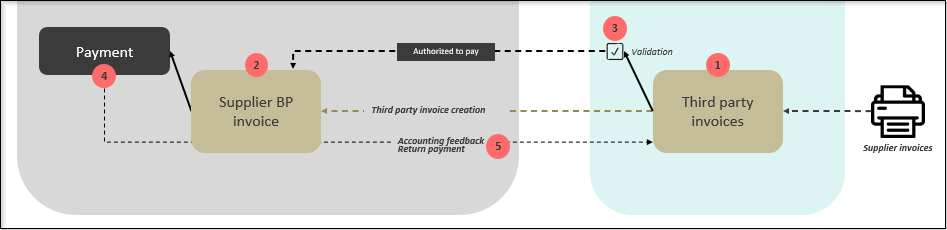
Diagram of the different possible flows:
- Sage X3 Finance & Purchasing, with purchasing workflow in Sage X3
- Sage X3 Finance & Purchasing, with purchasing feed in Yooz
- Sage X3 Finance
- Sage X3 Sales Invoices
4. Outside the perimeter
Specific adaptations
Certain modifications or specific adaptations to the Purchasing, Finance, and Sales modules of Sage X3, particularly concerning purchase and sales invoices, may not be compatible with the standard scope of the Yooz connector. We are referring, of course, to significant or highly impactful modifications. Any incompatibilities can be detected during connector installation and will be highlighted during acceptance testing.
Foreign laws
Local legal requirements or the specificities of foreign legislation are outside the scope of this service. The only exceptions are Switzerland (QR code management) and Spain (supplier withholdings on purchase invoices), which are fully supported.
Additional invoices
Additional invoices are not handled by the connector. This is being considered for a future update of the connector.
Direct receptions
The PTHDIR (direct receipt) parameter must be set to "No"; direct receipts are not permitted. The same rule applies to the PNHDIR (direct supplier return) parameter, which must also be set to "No". This management rule is justified by the fact that the Yooz application cannot manage received quantities without an order. An order is mandatory in Yooz.
Sage X3 Saas
The connector is not currently compatible with the new Sage X3 SaaS offering.
5. Connectivity between Yooz and X3 applications
5.1 Introduction: Context and security philosophy
Sage X3 is an integrated management software package (ERP) designed with high native security standards. It incorporates robust authentication protocols and role-based access control to ensure data integrity within your internal network.
However, activating a connector with an external SaaS platform like Yooz requires opening an inbound communication channel from the internet. While Sage X3 is secure, best practices recommend implementing additional perimeter protection layers when exposing a service to the web.
The goal of this document is to define a scalable security framework for this data flow. We offer cumulative security options designed to scale with your organization's size and IT capabilities. Whether you're a small or medium-sized business seeking effective protection or a large enterprise requiring strict compliance, this document presents architectures ranging from simple network filtering to advanced application inspection. These layers can be combined to align with your organization's internal risk management policy.
5.2 Mandatory web exposure for Sage X3
It seems appropriate to start with a simple basic reminder: the Sage X3 solution must be accessible from the Internet.
Of course, it's perfectly possible to apply IP address restrictions, use a reverse proxy, or a WAF. However, the following rules are mandatory:
- A valid domain name must be used (for example:.with, .fr, .net, .org...).
- A valid SSL certificate must exactly match the public URL.
Conversely, local IP addresses and insecure (HTTP) connections will not work.
Examples of configurations
- Correct: https://x3.XXXX.domain.com (URL protected by a valid certificate with a recognized public domain name).
- Incorrect: https://45.36.87.96/ (Public IP addresses cannot have a valid SSL certificate for this type of use).
- Incorrect: http://myawesomedomain.com (The site is not secured with the HTTPS protocol).
- Incorrect: https://myawesomesite.local or https://erp-server/ (local domain names or simple machine names. They are not publicly recognized on the Internet; the extensions.andor.localare not covered).
- Incorrect: https://localhost or https://127.0.0.1 (local addresses, completely inaccessible from the outside).
- Invalid, self-signed or expired certificate: Even with a correct HTTPS URL, if the certificate is not issued by a recognized certificate authority or if it does not exactly match the domain name of the URL, the connection will systematically be rejected.
5.3 Technical prerequisites and flow specifications
Before implementing a specific security architecture (described in Chapter 4), several fundamental requirements must be met to establish a functional and secure connection between the Yooz platform and the Sage X3 server. These prerequisites apply to all security scenarios (options A, B, and C).
5.3.1 End-to-end encryption (Protocol)
To guarantee the confidentiality of data in transit (invoices, accounting entries), the communication channel must be fully encrypted.
- Requirement: The connection must use the HTTPS protocol with TLS 1.2 (or higher).
- Certificate: A valid public SSL certificate (e.g., issued by DigiCert, Let's Encrypt, or similar) must be installed on the public entry point (firewall or reverse proxy). Self-signed certificates are not compatible because they cause validation errors on the Yooz application side.
5.3.2 Whitelist of destination domains/IP addresses (outgoing traffic)
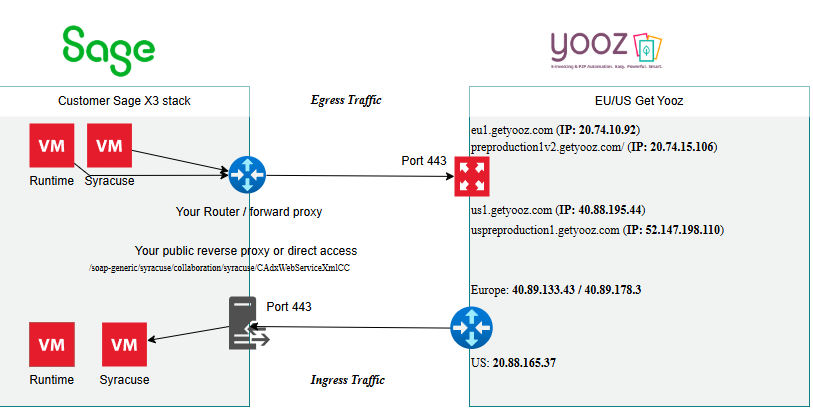
Although Yooz pushes data to Sage X3, the Sage X3 server must also be able to initiate outbound connections to Yooz. If your organization restricts outbound internet traffic by default, you must configure your firewall to allow the Sage X3 server to reach the Yooz infrastructure.
- Requirement: Allow outbound HTTPS traffic (port 443) from the Sage X3 server to the following Yooz endpoints, depending on your hosting region:
Environments Europe
- API production / App Gateway: eu1.getyooz.com (IP: 20.74.10.92)
- Pre-production API / App Gateway: preproduction1v2.getyooz.com (IP: 20.74.15.106)
US Environments
- API production / App Gateway : us1.getyooz.com (IP: 40.88.195.44)
- Pre-production API / App Gateway:uspreproduction1.getyooz.com (IP: 52.147.198.110)
5.3.3 Considerations regarding the outgoing proxy (Direct Proxy / Forward Proxy)
The following specifications pertain to advanced network architectures involving restrictive proxies and SSL inspection. Because these configurations are highly dependent on your organization's specific security stack and technical infrastructure, the implementation process is considered collaborative. Some adjustments may be necessary during the initial connectivity phase to ensure seamless alignment with your internal network policies and proxy heuristics.
If your organization routes outbound Internet traffic through a restrictive proxy (e.g., a forward proxy with strict rules, SSL interception, or data leak prevention [DLP]), specific configurations are required to ensure that the Sage X3 server can communicate with Yooz endpoints.
The connector initiates outbound requests via two distinct mechanisms: native calls to Sage X3 web services and server-side curl commands. Both methods support routing through an enterprise proxy.
Target URLs: The proxy must explicitly allow outbound traffic to the Yooz endpoints corresponding to your hosting region:
- Europe: https://eu1.getyooz.com And https://preproduction1v2.getyooz.com .
Media types and file exchange: Communication relies on standard HTTPS requests. For outgoing data (from Sage X3 to Yooz), the connector calls Yooz's REST APIs. The data exchanged consists exclusively of JSON payloads and CSV files (for reference data exports). The connector does not trigger downloads of executable files, scripts, or binary file types that are typically blocked.
Proxy details specification: Proxy details are entered differently depending on the IT component:
- For web service requests (Syracuse): The proxy settings are configured natively in the Sage X3 interface.
- For Curl queries: The proxy details (host, port, and authentication) can be passed directly as arguments (via the option-x) in a specific parameter value of the connector in Sage X3.
Example of a Curl configuration for a proxy with SSL certificates:
-x https://proxy.yourdomain.com:443 --proxy-user user:password --cacert /path/to/your/proxy-ca-bundle.crt
Note: This configuration is managed in the connector's internal settings by our technical team.
SSL Interception and Certificate Stores: If your proxy performs an SSL inspection, it will present its own internal certificate. The connector components do not rely solely on the operating system's global certificate store. Therefore, your proxy's trusted root certificate authority (Root CA) must be recognized at the application level.
- For Syracuse: The proxy's Root CA certificate must be imported via the Sage X3 certificate management interface (Administration > Certificates > Certificates).
- For Curl: The path to your proxy's certificate bundle (CA bundle) must be provided to our team so that it can be referenced in the command arguments using the option--cacert.
Data Exfiltration Control / Content Inspection: Proxy systems that monitor file exfiltration can flag or block outgoing JSON or CSV payloads. Since proxy rules vary between organizations, a brief testing phase is recommended to observe the proxy logs and implement the necessary exceptions for legitimate connector traffic.
5.3.4 Whitelist of source IPs (incoming traffic)
The connector operates in "Push" mode, meaning that Yooz initiates the connection to send data to Sage X3. To secure this connection, the implementation of a strict IP address whitelisting policy is required.
- Requirement: The customer is responsible for configuring and maintaining an access control list (ACL) on their edge firewall. This list defines which external IP addresses are allowed to connect to the dedicated port.
- Configuration Yooz: To activate the connector, the official IP address of the Yooz infrastructure must be added to this whitelist.
- Authorized IP address for Europe: 40.89.133.43 and 40.89.178.3 (This IP address corresponds to the Yooz Gateway hosted on Microsoft Azure for the production environment, European instances).
- Authorized IP address for the United States: 20.88.165.37 (This IP address corresponds to the Yooz Gateway hosted on Microsoft Azure for the production environment, US instances).
5.3.5 Availability of the target service (Sage X3 Web Services)
The Yooz connector does not interact with the standard user interface used by your employees. It communicates specifically with the Classic SOAP web services engine of Sage X3.
- Requirement: "Classic SOAP web service pools" must be properly configured to handle the incoming data flow.
- Implementation note: The configuration and startup of these specific web service pools will be carried out during the installation and configuration of the connector.
- Separation of flows: This ensures that incoming traffic is handled by the automated interface layer, separate from the interactive user session layer.
5.3.6 Network Address Translation (NAT)
Since the Sage X3 server is hosted on-premises (within your private network), it is not directly visible from the Internet.
- Requirement: A port forwarding rule (port forwarding / NAT) must be created on your peripheral network equipment in order to translate the public request to the internal IP address of the Sage X3 server (or reverse proxy, depending on the security option chosen).
- Port configuration: Although the standard HTTPS port (443) is recommended for simplicity and compliance reasons, the use of a custom external port (e.g.,8443, 4443) is fully supported if your internal network policy requires it.
5.4 Security implementation options
We offer a scalable security framework. Depending on the size of your organization, your internal resources, and your risk management policy, you can select the appropriate level of protection. These options are cumulative: Option B includes the requirements of Option A, and Option C requires an architecture compatible with both A and B.
5.4.1 Option A: Network access control (layers 3/4)
Recommended context: Small and Medium Enterprises (SMEs).
This option relies on your existing perimeter firewall to filter traffic based solely on the sender's IP address.
Implementation
- Create a NAT (port forwarding) rule on your firewall.
- Apply a strict access control list (ACL) that rejects all traffic by default (Deny All).
- Allow only the dedicated Yooz IP address (defined in chapter 5.5).
Security perimeter
- This configuration blocks all unauthorized connections from the general public on the Internet.
- Limitation: Although secure against external network scans, this method allows traffic to reach the Sage X3 web server interface if it originates from the authorized IP, without the possibility of inspecting the specific URL (URI) requested.
5.4.2 Option B: Application filtering and Reverse Proxy (Layer 7)
Recommended context: SMEs and medium-sized enterprises (ETIs).
This architecture introduces an intermediary component (reverse proxy, such as Nginx, HAProxy, or IIS) to isolate the ERP server from direct network traffic. This option is highly recommended to reduce the attack surface.
Implementation
- The firewall redirects traffic to the reverse proxy (located in a DMZ or a specific VLAN), and not directly to the Sage X3 server.
- The reverse proxy completes the SSL connection (decryption) and inspects the HTTP request.
Security policy (URI filtering)
- Allow: Only the exact path for the web service: /soap-generic/syracuse/collaboration/syracuse/CAdxWebServiceXmlCC.
- To block: The root path/the login page/auth and all other system paths should be rejected with an HTTP 403 Forbidden error code.
Security perimeter
- Even if a network connection is established from the Yooz IP, the general user interface and the Sage X3 login portal remain technically inaccessible.
- Only the endpoint specific to automatic data import is open.
5.4.3 Option C: Web Application Firewall (WAF) and Content Inspection (Payload)
Recommended context: Large companies and corporate environments.
For organizations equipped with dedicated security appliances (e.g., Fortinet, F5, Palo Alto) or complying with strict standards (such as ISO 27001), a WAF can be added to inspect the deep content of data packets.
Implementation
- Integration of network traffic into the company's WAF appliance.
- Security Policy (Deep Packet Inspection): The WAF analyzes the XML/SOAP payload to detect and block malicious code injections (SQL injections, XSS) within the data stream.
Important note regarding calibration
- Sage X3 uses complex SOAP XML messages. To avoid "false positives" (unintentional blocking of legitimate invoices), we recommend an initial phase in Learning Mode.
- We can provide a sample XML payload to help your security team calibrate WAF rules and allow standard characters used in billing.
5.5 Implementation complexity and operational impact
Choosing the right security architecture is a balancing act between risk mitigation and available IT resources. The following comparative table highlights the effort required for configuration and maintenance.
Option A: Network Access Control
- Complexity: Weak.
- Required skills: Standard network administration.
- Configuration: Rapid deployment (usually < 1 hour). Requires only the configuration of a standard firewall rule.
- Maintenance: No ongoing maintenance is required, except in the event of a change to the infrastructure's IP addresses.
Option B: Application filtering (Reverse Proxy)
- Complexity: Moderate.
- Required skills: System administration / web server management (Nginx, IIS, HAProxy).
- Configuration: Requires the installation and configuration of a proxy service, SSL termination management, and the writing of specific URL filtering rules.
- Maintenance: Low. Once the configuration is stabilized, it requires very little intervention.
Option C: WAF and content inspection
- Complexity: High.
- Required skills: Senior Security Engineer / NetSecOps.
- Configuration: Complex integration. Requires a learning phase to profile legitimate application traffic.
- Maintenance: High security level. Requires continuous monitoring to manage "false positives" (legitimate invoices blocked for security reasons). Any update to the Yooz format or the Sage X3 patch level may require rule adjustments.
5.6 Implementation roles and responsibilities
Security is a shared responsibility. The table below shows the distribution of tasks between the client (or their IT provider), the integrator, and Yooz.
| Component / Perimeter | Task description | Responsible party |
|---|---|---|
| SSL Certificate | Provision and installation of a valid public SSL certificate on the point of entry (firewall/proxy). | Customer IT department |
| Network security | Configuring firewall rules (NAT) and access control lists (IP whitelisting). | Customer IT department |
| Application security | Configuring the rules of the reverse proxy (option B) or the WAF (option C). | Customer IT department |
| Configuration Sage X3 | Activation and configuration of "classic SOAP web service" pools within the ERP. | X3 integrator |
| Connectivity tests | Validation of the secure channel (Telnet/Ping) and functional tests of connector transfer. | Yooz or Client |
| WAF calibration | Providing example XML payloads to help with WAF rule tuning (if option C is chosen). | Yooz or X3 integrator |
5.7 Conclusion
By implementing the security measures described in this document, the automated connection between Yooz and Sage X3 can be established permanently without compromising the integrity or security of your ERP system.
For on-premise customers
For customers managing their own infrastructure or servers, the responsibility for securing incoming traffic lies entirely with your internal IT department or your managed service provider.
Although option A (Network access control) provides a functional starting point, we strongly recommend implementing at least option B (Reverse Proxy) for any production environment. This architecture offers the best balance between security and operability by making the ERP user interface and login portal completely inaccessible from the Internet.
Please select your preferred architecture (A, B or C) and forward these technical specifications (including the information in Chapter 3) to your network administrator.
6. X3 secure connection settings to Yooz
The goal is to establish secure communication between the Sage X3 ERP system and the Yooz platform. The old login/password authentication method is obsolete; it has been replaced by the OAuth 2.0 protocol, which requires three mandatory parameters.
Step 1 - Retrieve the Application ID
This is the Yooz environment identifier. The application ID allows the connector to tell the API which client (tenant) folder to point to.
Log in to the Yooz client application. Place your mouse cursor (without clicking) on the Yooz logo in the top left corner of the screen.
A tooltip appears: locate the Application line and Copy the identifier in UUID format (ex: 82f7576c-c88e-4868-bb51...)
You can press CTRL+C when the tooltip is displayed; this copies the information, then paste it into a text document.
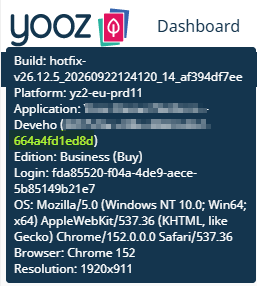
Step 2: Retrieve the API keys (Client ID and Client Secret)
These two keys constitute the secure credentials that authorize Sage X3 to interact with Yooz. There are two ways to obtain them:
Option A (recommended): Request them directly from the Yooz project manager. For security reasons, they will generally be sent to you via a one-time-use link (such as a One-Time Secret).
Option B (Independently): If you have Administrator rights in Yooz, go to the Settings menu > Integrations > Public API (or OAuth 2.0 Authorization Code).
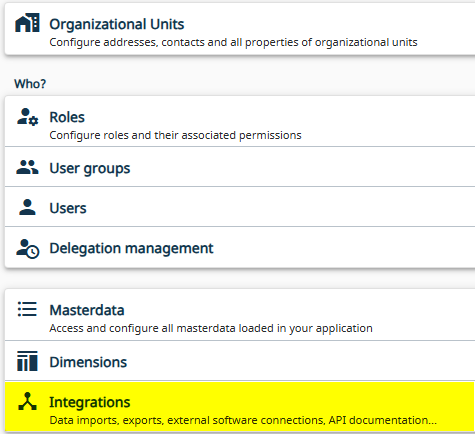
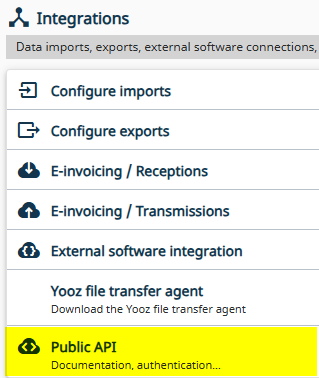
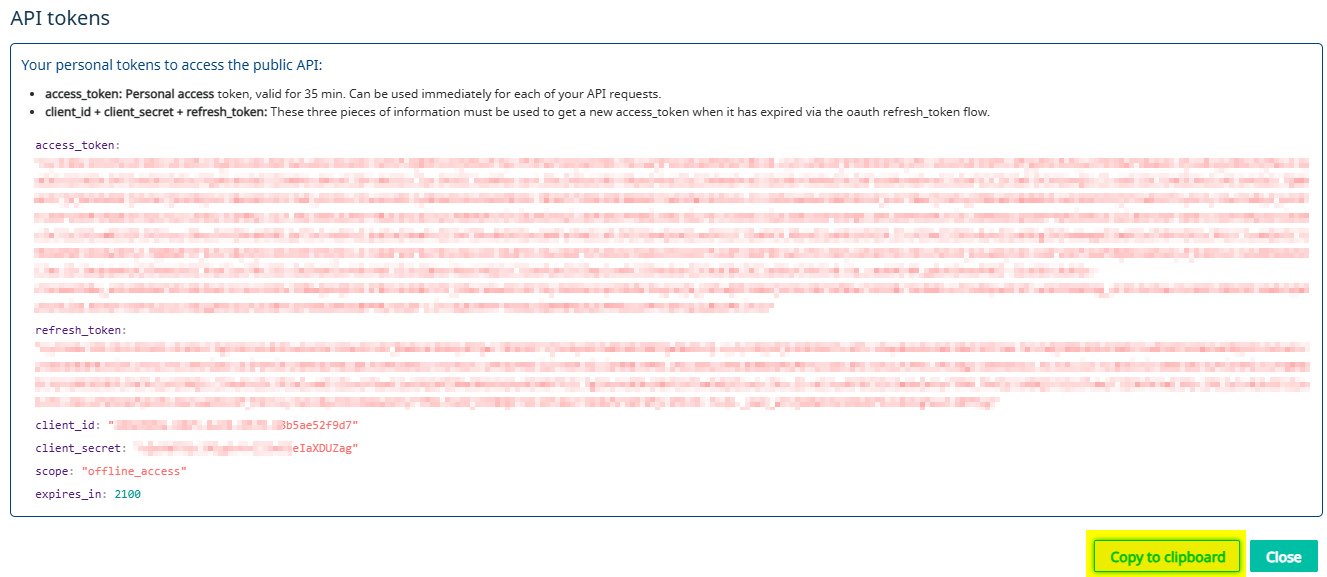
Click the button to get the API tokens.
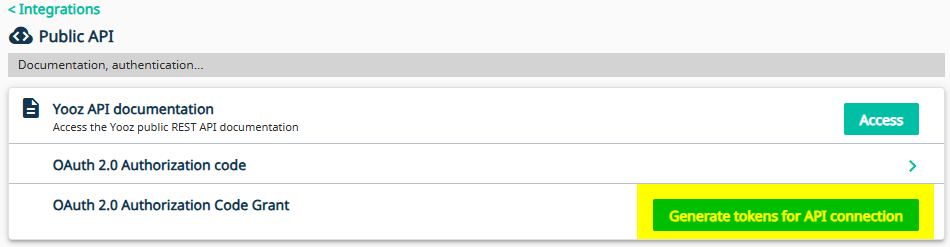
You obtain the client ID and client secret information.
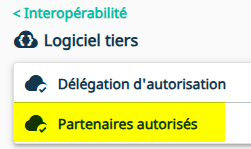
Finally, you need to check the authorized partner. To do this, go to Setup > Integrations > Third-party software.
Then select your partner code from the list
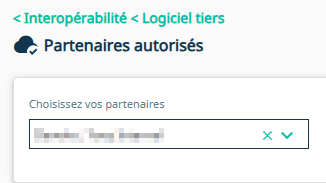
If you cannot find your partner code in the list, You need to contact your Yooz representative.
Step 3: Enter the connection settings in Sage X3
This is where you insert the three values retrieved previously to activate the link.
In Sage X3, navigate to: Setup > General parameters > Parameter Values
Select the EXAPP (External Applications) chapter
Expand the details and select the YOOZ group
Please specify the following three parameters:
XRJ31APPID (applicationId) = Paste the application ID
XRJ31CLIID (Yooz Client Id) = Paste the client ID
XRJ31CLISC (Yooz Client Secret) = Paste the client secret
When copying and pasting credentials (especially the client secret), make sure not to leave any empty spaces (neither before nor after the string of characters) or you may trigger a "401 - Invalid client credentials" error during communication tests.
Step 5: Checking REST web services
The two REST web services required for the connector must already be present in the Sage X3 solution. If not, you can obtain them by importing the JSON files. This is described in the chapter 3- Technical installation and updates, paragraph 3. By default, they are coded XRJ31YOOZ and XRJ31TOKEN.
You must verify that these web services correctly point (base URL) to the client's Yooz application URL.
Yooz application URLs may be
https://eu1.getyooz.com
https://preproduction1v2.getyooz.com
https://us1.getyooz.com
https://uspreproduction1.getyooz.com
Therefore, two REST web services are needed in X3, which include the client's Yooz application root with the following suffixes.
/yooz/v2/api/
/auth/realms/yooz/protocol/openid-connect/token
Example for a Yooz application
https://eu1.getyooz.com


If a single Sage X3 solution contains folders that do not communicate with the same Yooz application, it is possible to:
- Declare 2 new web services that point to the 2nd Yooz instance (with a different URL)
- Enter the codes for these web services in the parameter values XRJ31RESTT and XRJ31RESTY (chapter “EXAPP”, group “YOOZ”).
It is essential to create these new shared web services on an X3 solution, and make them usable by all folders.
The connector then behaves as follows: it prioritizes the web services defined in the parameter values. If the parameter values are empty, it hardcodes the XRJ31YOOZ and XRJ31TOKEN web services.
Client ID and Client Secret information are stored at the folder level, so it is entirely possible to have different values per folder.
Step 6: Verification and troubleshooting
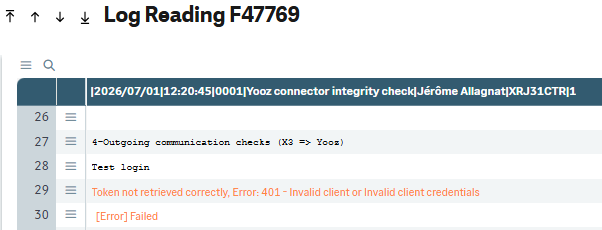
If you have entered all the information correctly, you can perform a Sage X3 to Yooz connectivity check.
To do this, launch the XRJ31CTR Yooz connector control function, via the Usage > Imports/Exports menu.
The trace displays the status of the outgoing communication (X3 => Yooz).
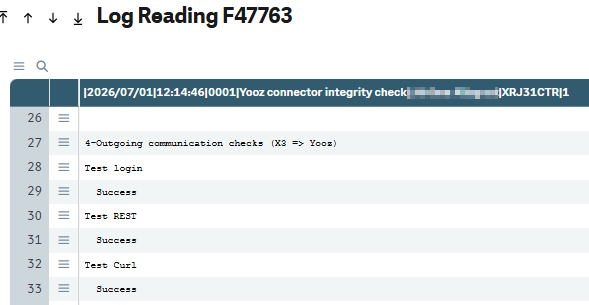
If the trace displays “Success”, this part is validated.
And if the trace displays a 401 error, you must contact your Yooz representative because settings on Yooz need to be adjusted.
7. Connection settings for the US zone
This section is a summary and synthesis of information specific to the US zone.
Whitelist of destination domains/IP addresses (outgoing traffic)
Although Yooz pushes data to Sage X3, the Sage X3 server must also be able to initiate outbound connections to Yooz. If your organization restricts outbound internet traffic by default, you must configure your firewall to allow the Sage X3 server to reach the Yooz infrastructure.
us-prd: 20.88.165.37
us-ppd: 20.81.25.81
Services web REST
| Nom | Base URL |
|---|---|
| XRJ31YOOZ | https://us1.getyooz.com/yooz/v2/api/ |
| XRJ31TOKEN | https://us1.getyooz.com/auth/realms/yooz/protocol/openid-connect/token |
Parameter values (ADPVAL function)
| Nom | Code valeur paramètre | Valeurs |
|---|---|---|
| Time zones | XRJ31TIMZO | For Eastern Time: America/New_York For Central time: America/Chicago For MST: America/Denver For PST: America/Los_Angeles |
| Yooz URL Documents | XRJ31URLDO | https://us1.getyooz.com/yooz/v2/api |
| User language | XRJ31USRLA | en-US |